1. Home
  2. Platform
  3. Connectors

Works with the tools you already run on.

WiseOrg connects to more than 60 apps, from Google Workspace, Microsoft 365, HubSpot, Salesforce, Slack, Jira and GitHub to Stripe, Zendesk and Mixpanel, and to any MCP server by address. It reads from them into one knowledge graph and acts through them. Anything customer-facing still waits for a person to approve.

Which tools does WiseOrg connect to?

More than 60 apps in the catalogue, grouped the way the product groups them. Zapier and Composio reach thousands more.

  • Productivity: Google Workspace, Microsoft 365, Notion, Asana, monday.com, ClickUp, Todoist, Airtable, Miro, Box, Dropbox, Canva, Figma, DocuSign
  • Sales and deals: HubSpot, Salesforce, Apollo, Attio, Close, Gong, Hunter, Instantly, ZoomInfo, Crunchbase
  • Meetings: Granola, Fireflies, Wispr Flow
  • Engineering: GitHub, Jira and Confluence, Linear, Sentry, Vercel, Supabase, Neon, MongoDB, Cloudflare, Datadog
  • Marketing and analytics: Amplitude, Mixpanel, PostHog, Similarweb, SE Ranking, Webflow, invideo, HeyGen, Runway, Higgsfield
  • Support and messaging: Slack, Cheerio (customer WhatsApp groups and campaigns), Intercom, Zendesk, Freshdesk
  • Finance: Stripe, Razorpay, PayPal, Square, Xero, Chargebee, Ramp
  • Data and research: Firecrawl, Tavily, Bloomberg, Greenhouse
  • Everything else: Zapier, Composio, or any MCP server by address
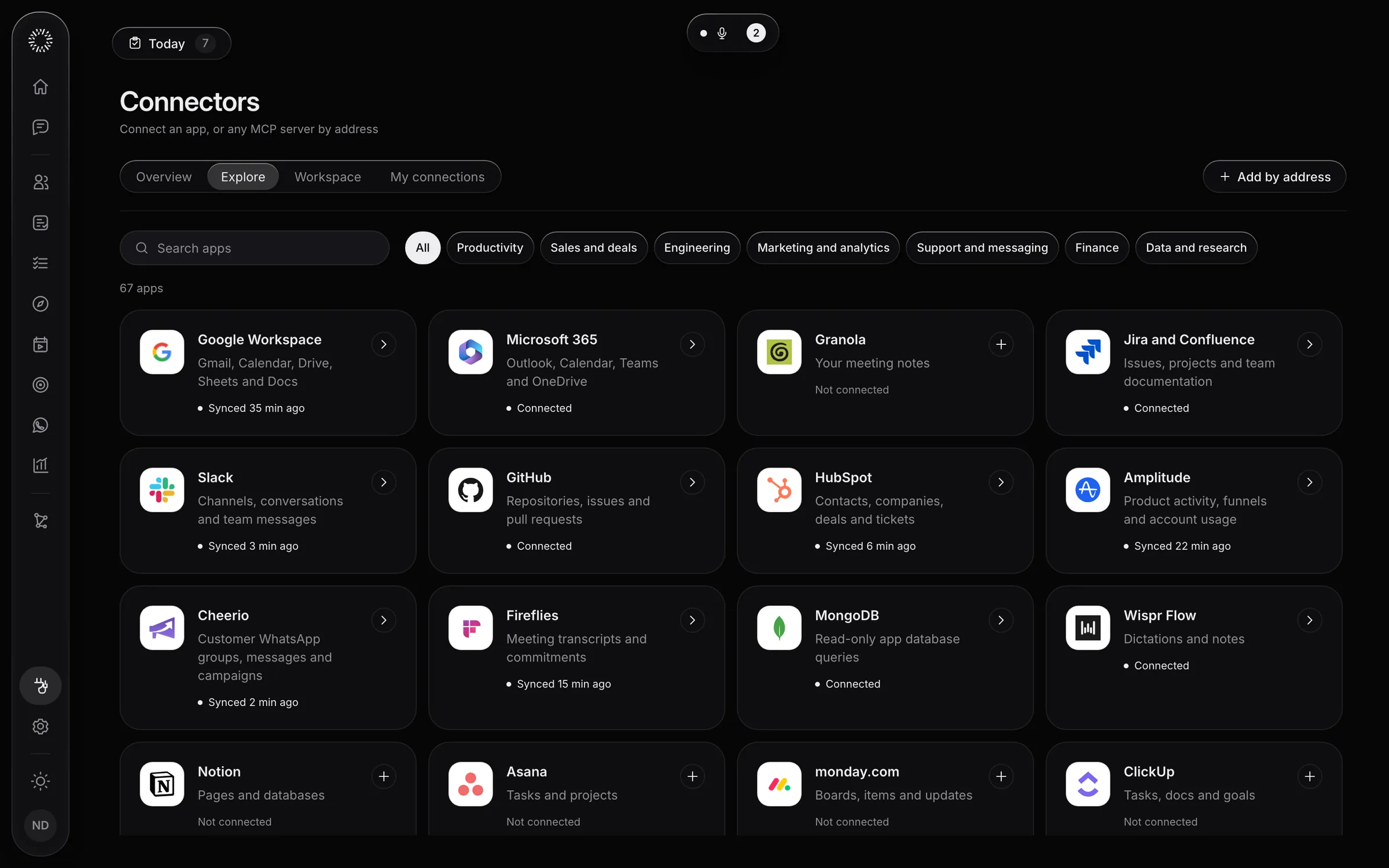
The connector catalogue: more than 60 apps, plus any MCP server by address
The connector catalogue, in a sample workspace

How does WiseOrg use what it connects to?

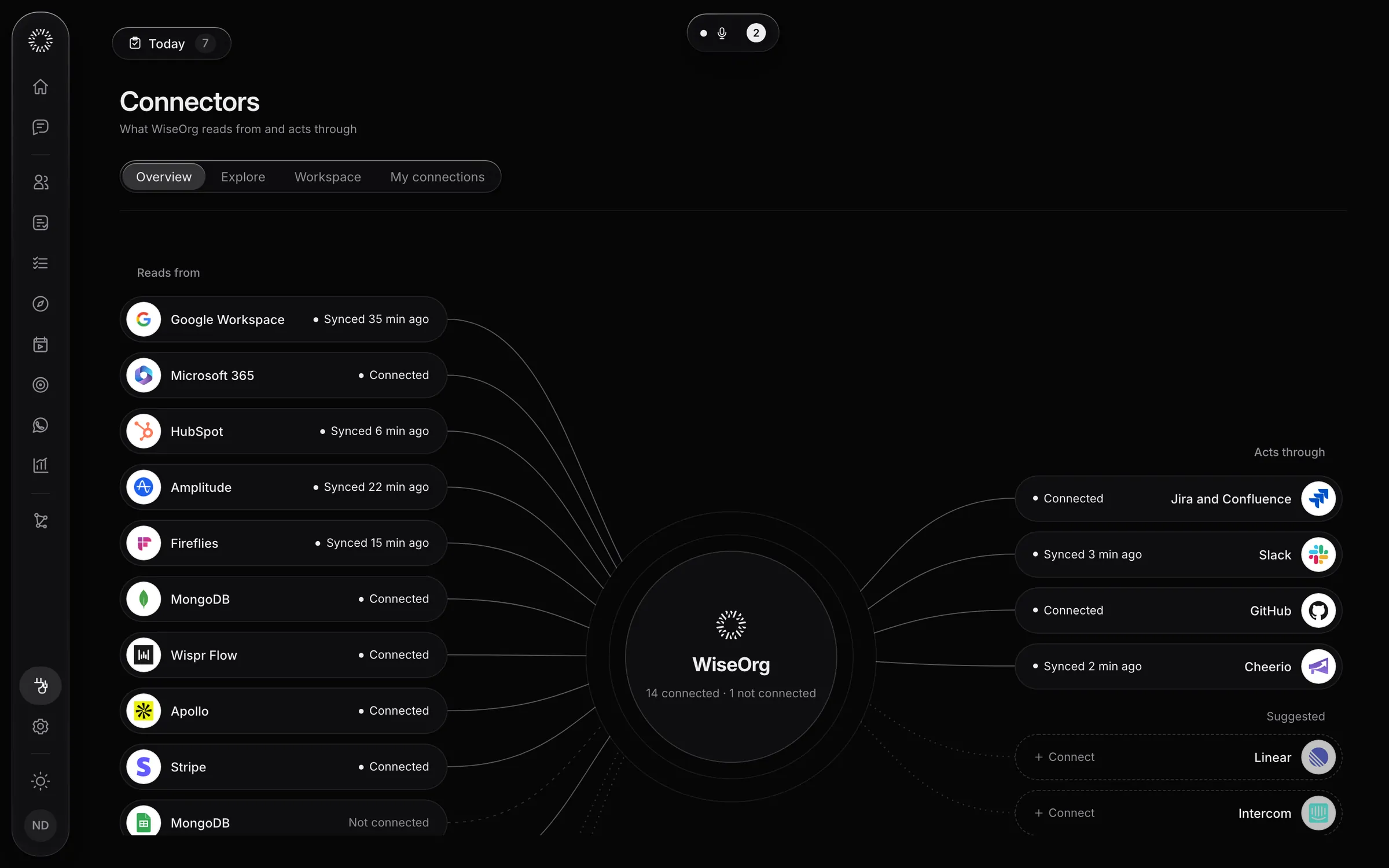
It reads from some tools and acts through others. The overview shows both, with when each last synced.

Connectors: the tools WiseOrg reads from and acts through
Connectors, in a sample workspace

What is the difference between workspace and private connections?

An owner sets up workspace connectors that the whole team works from. Private "my connections" are yours alone, such as your own inbox.

Can we connect a tool that is not listed?

Yes. Add a custom MCP server and WiseOrg can read from it and act through it. The MCP explorer shows what each server offers before you switch it on.

What can WiseOrg do through a connector?

It reads to understand and acts to get the work done: it updates a record, drafts an email, opens a pull request. Customer-facing actions wait for approval, and unattended runs use pre-approved tools only.

Questions buyers ask

What is MCP?

The Model Context Protocol is an open standard for connecting AI applications to tools and data. WiseOrg works with custom MCP servers, so a tool with an MCP server can be connected.

Does connecting a tool let WiseOrg message customers on its own?

No. Anything customer-facing waits for a person to approve it.

Is it safe to connect our systems?

Each hosted workspace has its own database, storage and credentials, and nothing is shared across companies. Access is enforced in the database by role and seniority. Anything customer-facing waits for a person. With private deployment, WiseOrg runs in your own cloud.

Every risk with an owner. Every directive in motion.

Book a demo to see the loop run end to end.